The EPC board pack — WBS roll-up, earned value and RAG on one page
Every month the steering committee gets a one-pager. Right now yours is stitched together from a P6 export, three Excel tabs, a hand-painted RAG table and a screenshot of the Gantt pasted into slide 4. Here's how to build the whole board pack — phase bars, cost and earned value, an EVM S-curve, stoplights, milestones and the data date — from the master, on one page, in the browser.
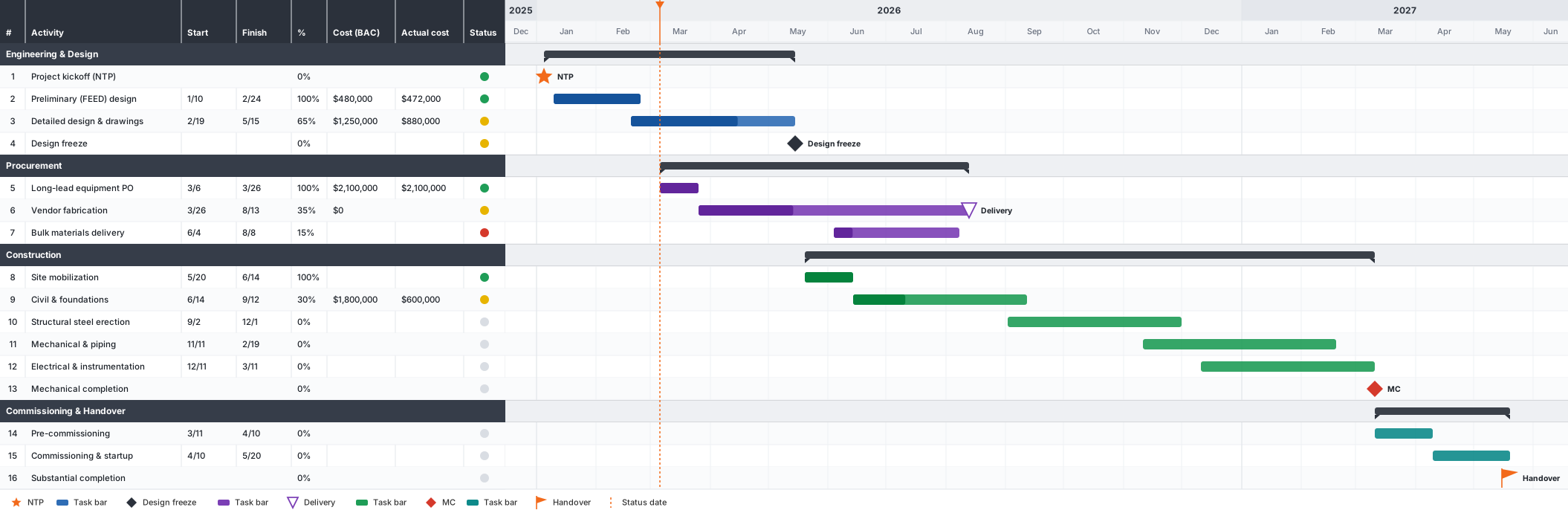
On a capital project the board doesn't want the 4,000-line schedule. They want six or eight lines: engineering, procurement, each construction area, commissioning, handover. For each one they want to know three things at a glance — is it on time, is it on budget, and when does it finish — plus the milestones that trigger the next payment and the date the whole picture was cut. That's the board pack. It's the single most-read artefact your controls team produces, and it's usually the most painful one to assemble.
The pain is that the pieces live in different places. The network lives in P6. The cost sits in the cost system or a spreadsheet. The RAG is a judgement call somebody types into a table by hand. The S-curve gets rebuilt in Excel every month from a fresh export. Then it all gets flattened into slides, and by the time it reaches the committee it's a week stale and impossible to drill into. It doesn't have to work that way. The master already has the structure; you just need to present it at the altitude the board reads at.
What the board actually reads
Strip a good capital-projects one-pager back and it's five layers, always the same five:
- The WBS rolled up to phases. Not tasks — summary bars. One bar per phase or area, each spanning its children, so the whole job reads as six to ten rows.
- Cost and earned value, per phase. Budget, actual cost, and the value earned so far — the money columns next to each bar, plus CPI/SPI where the board asks for it.
- An EVM S-curve. PV, EV and AC over time, so the trend is visible, not just this month's snapshot.
- RAG stoplights. A red/amber/green dot per phase, driven by a rule — schedule variance, or a slip threshold — not by whoever felt optimistic that morning.
- Milestones and the data date. NTP, design freeze, mechanical completion, handover — the dated markers that matter — and a clear line showing exactly when the status was cut.
Everything on that list can be derived from a cost-loaded P6 master. The trick is rolling it up to the right level and putting the money, the colour and the milestones on the same page as the bars. Here's the finished article first, then how to build it.
Build it from the master in five moves
The whole thing is one import and four presentation moves on top of it. The P6 file never changes — you're building a view over it, not editing the network.
- Import the P6 master. Drop the cost-loaded
XERorP6 XMLstraight into Sketchedule. The WBS structure, activities, dates, baseline, resources and costs all come across, and it parses in your browser — nothing is uploaded to a server. If your cost sits outside P6, bring it alongside as an Excel/CSV and map the columns. - Collapse the WBS to phase summary bars. This is the move that turns 4,000 lines into a board pack. Use the outline levels to collapse to the phase or area level; Sketchedule draws an automatic summary bar spanning each phase's children. Add section bands for the big divisions (Engineering, Procurement, Construction, Commissioning) and shade them so the structure reads at a glance.
- Add cost / EV columns and the S-curve. Drop Cost, Actual and Earned Value columns into the left grid — plus CPI/SPI as calculated SmartColumns if the board wants the indices. Then add a ValueSet/Datagraph for PV, EV and AC and Sketchedule accumulates the EVM S-curve beneath the bars, on the same timescale (Fig 2).
- Add RAG, milestones and the data date. Set a RAG stoplight column driven by a rule — schedule variance, or a slip threshold — using conditional milestone/indicator symbology so the colour is computed, not typed. Mark the key milestones (NTP, design freeze, MC, handover) as symbols on the timeline, and set the data date so the status line and the dashed cut-off appear.
- Export or refresh monthly. Ship the page as a landscape PDF or PowerPoint, or send a read-only link that rebuilds the whole board pack — bars, curve, RAG, milestones — in the recipient's browser. Next month, refresh/relink from the updated P6 master with a diff preview and the whole pack re-draws. No rebuild.
The EVM S-curve does the trend the snapshot can't
The RAG table tells the board where each phase stands today. What it can't show is direction — whether procurement is recovering or sliding further, whether the cost gap is widening. That's the S-curve's job. Three cost-over-time lines — planned value from the baseline, earned value from % complete, actual cost from booked spend — and the two gaps read straight off: the horizontal EV-to-PV gap is schedule variance, the vertical AC-to-EV gap is cost variance.
Make the RAG defensible
The fastest way to lose a board's trust is a RAG column somebody clearly hand-coloured. If procurement is amber this month and green next with no change in the underlying dates, the committee stops believing the dots — and once they stop believing the dots, they stop believing the pack. So drive the colour from a rule.
Point the stoplight at a value: schedule variance in days, or a slip threshold against the baseline. Green under a fortnight of slip, amber up to a month, red beyond — pick the bands with the PMO and write them down. Sketchedule's conditional symbology computes the colour locally from the column, so the same rule runs every month and the pack is consistent by construction. When a director asks "why is Area 1 red?", the answer is a number, not a mood.
One page, drilled and dated
The board reads the roll-up, but the questions come from underneath it. "Why is Area 1 red?" needs an answer in the room, and the honest one is to expand that phase and show the two activities that slipped. Because the board pack is a live view over the master — not a screenshot — you can collapse and expand on the spot: present at phase level, drop into the detail when a director pushes, roll back up. The same file carries both altitudes.
And date everything. A board pack without a visible data date is a trap — someone always reads last month's amber as this month's, or argues a milestone that already moved. The dashed data-date line, on both the bars and the S-curve, tells the committee exactly when the picture was cut. Solid to the line is actual; beyond it is forecast. No ambiguity about what's done and what's still a promise.
| Board-pack layer | Comes from | Built with |
|---|---|---|
| Phase bars | WBS collapsed to phase level | Outline levels + automatic summary bars |
| Cost / EV columns | Cost-loaded P6 (or Excel) | Grid columns + calculated SmartColumns |
| EVM S-curve | PV / EV / AC over time | ValueSet + Datagraph |
| RAG stoplights | Slip / schedule variance | Conditional (rule-driven) symbology |
| Milestones + data date | Key dates + status cut-off | Milestone symbols + data-date line |
Key takeaways
- The EPC board pack is five layers — phase bars, cost/EV, an S-curve, RAG and milestones + data date — all derivable from the cost-loaded P6 master.
- Import the master, collapse the WBS to phase summary bars, add cost/EV columns and the EVM S-curve, then RAG, milestones and the data date — five moves, one page.
- Drive RAG from a rule (slip or schedule-variance thresholds) so the colour is computed and defensible, not hand-painted.
- The pack is a live view over the master: expand a phase to answer "why is it red?" in the room; refresh/relink next month and every layer re-draws.
- P6 owns the network; Sketchedule presents it and does the EVM maths. Export a landscape PDF/PPT or send a read-only link.
Build your next board pack from the master
Open Sketchedule in a browser — free, no install, nothing uploaded. Import a cost-loaded P6 file and collapse it to a one-pager.
Primavera and P6 are trademarks of Oracle Corporation; Microsoft Project is a trademark of Microsoft Corporation. Sketchedule is an independent product and is not affiliated with, endorsed by or sponsored by Oracle or Microsoft. Figures are illustrative, drawn in Sketchedule; the numbers shown are worked examples for explanation.